← All changes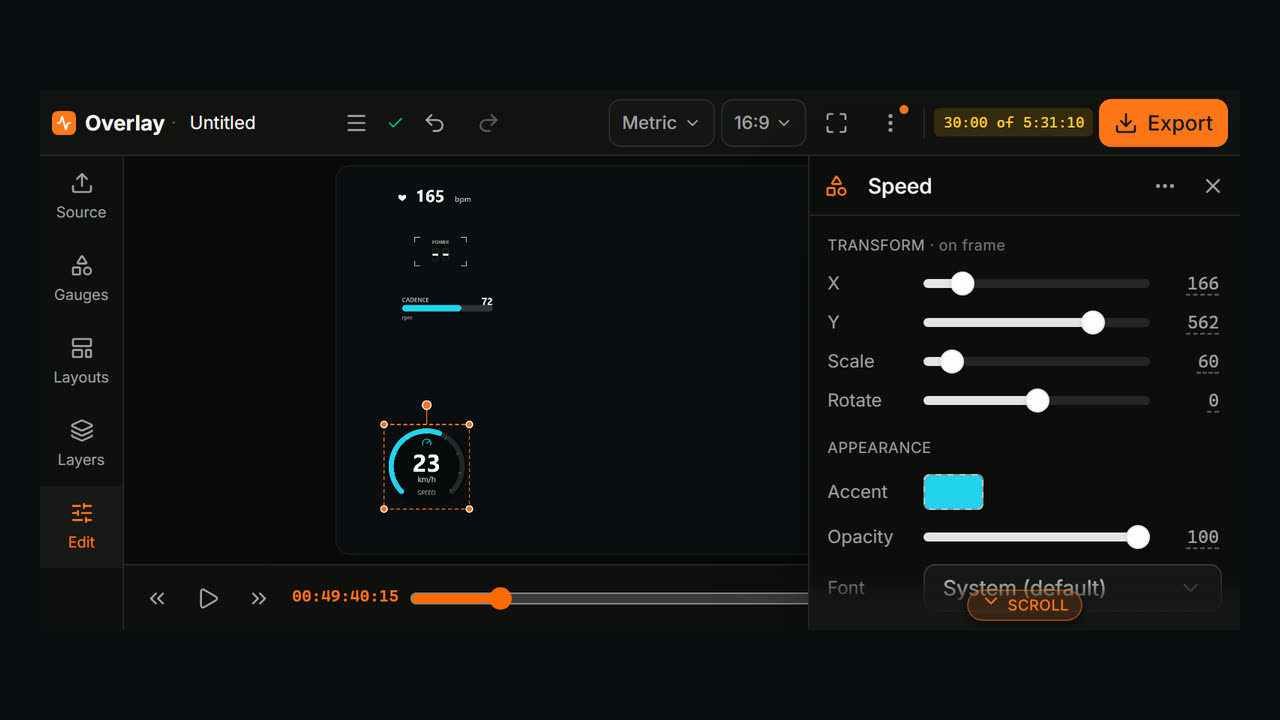
October 21, 2026
OverlayNewMake overlays on your phone: the Overlay editor now has a landscape layout built for small screens.
Open the Overlay editor on your phone and it switches to a layout made for a phone held sideways.
- Turn your phone sideways. The editor works in landscape. If your browser allows it, the Go fullscreen in landscape button hides the address bar and turns the screen for you. On iPhone, just rotate the phone.
- Panels slide in when you need them. Tap Source, Gauges, Layouts or Layers on the left to open that panel over the preview, and tap it again (or the ×) to close it.
- Tap a gauge to edit it. Its Properties slide in from the right, and × closes them when you're done. Opened another panel in between? The Edit button on the left brings them back. Tap any number to type an exact value.
- The timeline folds away. Play, skip and scrub from the bar under the preview, and tap Timeline to open the full tracks when you need to trim clips or sync your GPS data.
Units, aspect ratio and Export are in the top bar. What's new and feedback are in its ⋮ menu.