← All changes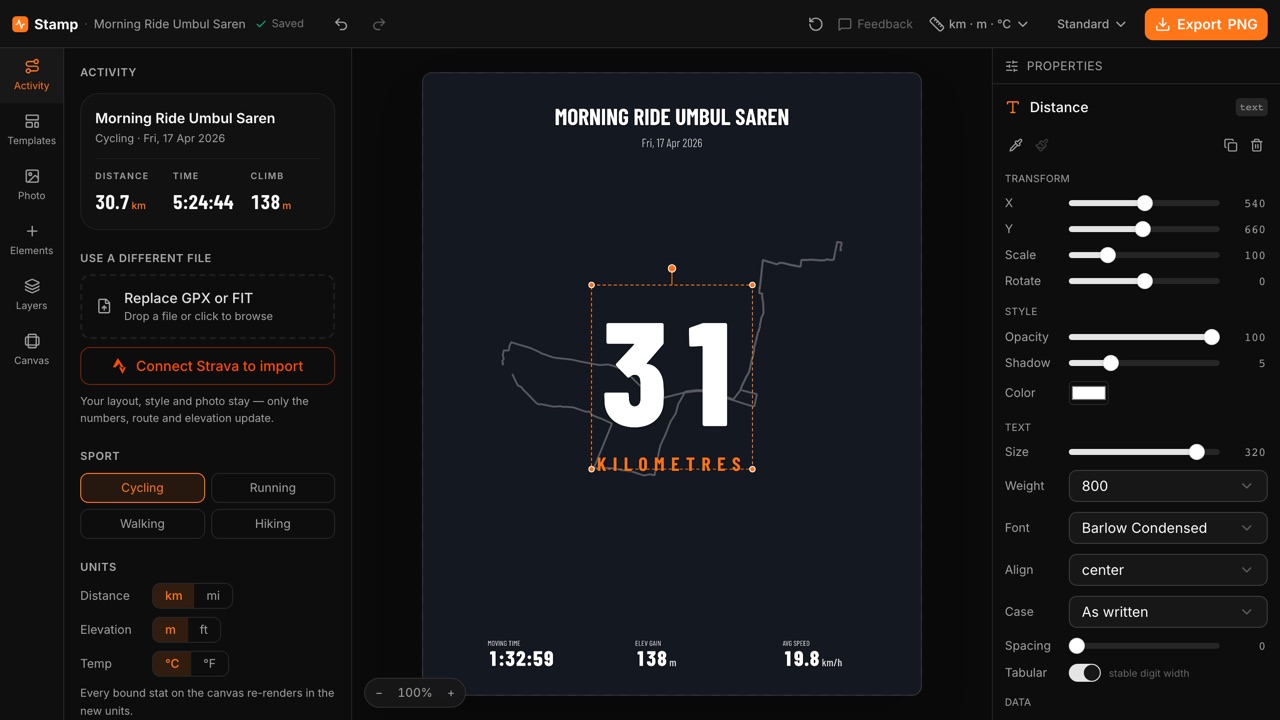
October 3, 2026
StampImprovedA new Stamp editor: six fresh templates, every element styled down to the font, and your work saved as you go.
Load a GPX or FIT file and a starter layout appears straight away; the sport (ride, run, walk or hike) is read from the file.
- Six templates — On-photo, Route hero, Photo + panel, Elevation, Big number and Transparent — each previewed with your own ride and photo. Arrange one the way you like and Save this layout to drop it onto your next activity.
- Add only what your file has. The Elements tab lists the stats your activity actually recorded, grouped by Distance & time, Speed, Pace, Elevation, Heart rate, Cadence, Power and more, plus a title, date, sport tag, route map, elevation profile and a dark scrim for legibility.
- Style every piece. Pick a font, weight, letter spacing and upper/lower case; colour a stat's unit on its own; give the route an outline, a glow and start/end dots; fill panels with a gradient. Double-click a stat to edit its label and its number separately, and copy a look from one element to paste onto another.
- Layers shows everything on your image: hide, lock, duplicate, drag to reorder, or shift-click for a range. Elements snap to edges and centres as you drag; on a phone, nudge buttons move them 2 px at a time.
- Units and formats: switch km/mi, m/ft and °C/°F from the top bar, and choose how the date and time read.
- Photo crop: zoom in and slide to pick which part of the photo fills the frame. Without a photo you get a PNG with a transparent background.
- Nothing gets lost. Your work saves in your browser as you go, and Undo still works after you reload the page.
Layouts saved in the previous Stamp editor are not carried over.